Why blocking beats deleting
Deleting social apps sounds decisive, but it usually fails within a week: you need Instagram for a friend's message, reinstall it "just for tonight," and you're back. Blocking is smarter because it targets the real problem. The app itself isn't the issue; unrestricted access at your weakest hours is. You keep your accounts, your messages and your genuine uses. You lose the 40-minute accidental scroll sessions.
First, find your expensive hours
Check where social media actually costs you time. For most people it's three windows: the first 30 minutes after waking, the workday's low-energy stretches, and the hour before sleep. Those three windows often hold two-thirds of daily social use, and they're exactly where a block does the most good.
Three ways to block social media
The one-tap block (for right now)
You catch yourself in the feed. Instead of relying on resolve, you start a timed block of 15 minutes to a few hours, and the apps are gone until it ends. Best for breaking a scroll session that's already started.
The category block (for whole platforms at once)
Rather than picking apps one by one, block the entire social category: Instagram, TikTok, X, Threads, Snapchat, Reddit and whatever gets installed next. No loophole where you flee one feed into another.
The schedule (for the same battle every day)
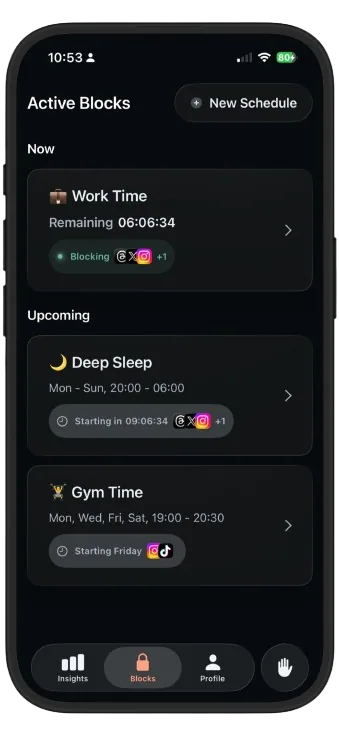
If the problem repeats daily, the boundary should too. A Work Time schedule blocks social apps 09:00–17:00 on weekdays; a Deep Sleep schedule takes them offline every night. Schedules run in the background, so you never re-decide.
- In Disconnect, tap New Schedule and name it. Say, Work Time.
- Select Instagram, TikTok and any other feeds, or the whole social category.
- Set the days and hours (for example Mon–Fri, 09:00–17:00) and save.
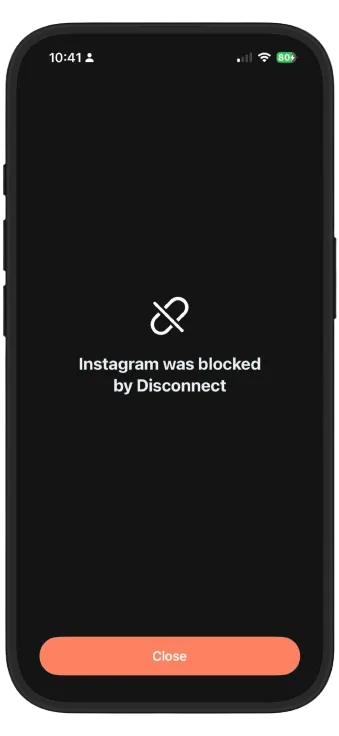
- From now on the schedule activates itself. Opening Instagram during those hours shows "Instagram was blocked by Disconnect" instead of the feed.
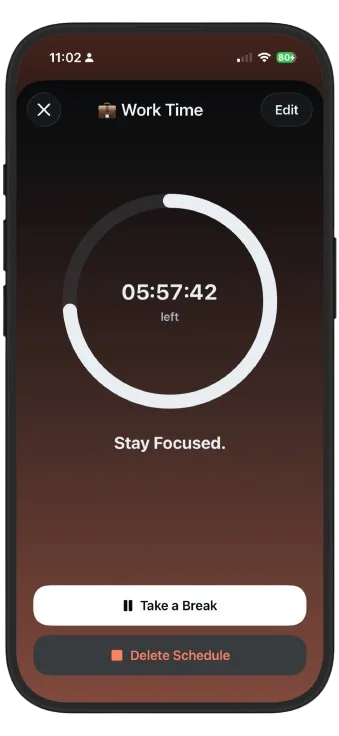
- Genuinely need access? Take a deliberate break in the app. That's a conscious choice instead of an autopilot scroll.
What changes when the feeds go quiet
The first days feel strange. You'll reach for the app and hit the blocked screen, and that reflex fading is the win. People typically report checking their phone less overall (not just the blocked apps), finishing work with energy left, and, the part nobody expects, not missing much. The feed you were afraid to leave rarely misses you back.